
Electric vehicle (EV) charging at home should be straightforward and hassle-free. However, like any electrical equipment, EV chargers can occasionally experience issues that prevent them from functioning correctly. Understanding how to identify and resolve these problems can save you time, money, and the frustration of an uncharged vehicle. This comprehensive guide covers the most common EV charger problems and provides practical solutions to get your charging station back up and running.
Understanding Your EV Charger Before Troubleshooting
Before diving into specific problems, it's important to understand that your EV charger is part of a complex system involving your home's electrical infrastructure, the charger itself, and your vehicle's onboard charging system. Issues can arise from any of these three components, making systematic troubleshooting essential.
Modern EV chargers, particularly those with smart features and app connectivity, include multiple safety mechanisms designed to protect both the vehicle and the electrical system. These protections include overcurrent protection, overvoltage and under-voltage protection, short-circuit protection, and overheat protection. When these systems detect an anomaly, they may stop charging to prevent damage, which can initially appear as a malfunction.
Common Problem 1: Charger Not Starting or Initiating Charge
One of the most frustrating issues EV owners encounter is when the charger fails to begin the charging session after plugging in. This problem can stem from several causes.
Troubleshooting Steps:
First, try the simplest solution: unplug the charging cable from your vehicle, wait approximately 30 seconds, and reconnect it firmly. Ensure you hear or feel the connection click into place, indicating a proper connection. Many charging issues resolve with this simple reset.
If reconnecting doesn't work, restart the charger by turning off the power switch, waiting one minute, and turning it back on. For wall-mounted units, you may need to flip the dedicated circuit breaker in your electrical panel. This power cycle can reset any software glitches or temporary communication errors between the charger and vehicle.
Check that the charging connector, cable, control box, and plug are all in good physical condition. Look for any visible damage such as cracks, melted plastic, rust, or loose connections. If the charging socket on your vehicle appears dirty or wet, wipe the charging plug with a clean, dry cloth before attempting to charge.
Verify that your vehicle is ready to charge. Some EVs require you to unlock the vehicle or press a button near the charging port before charging can begin. Consult your vehicle's manual if you're unsure about the proper procedure.
If your charger has RFID card authentication, ensure you're using the correct card and that it's properly registered. Swipe the card again or check the charger's settings to verify RFID requirements.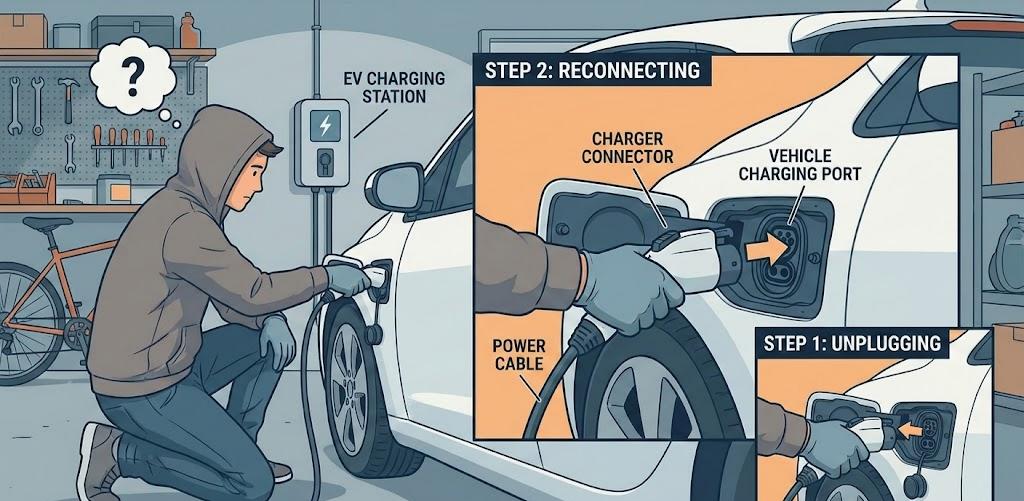
Common Problem 2: Charging Power Lower Than Expected
Many EV owners purchase a high-powered charger expecting rapid charging speeds, only to find their vehicle charging more slowly than anticipated. This discrepancy often creates confusion and concern.
Understanding Charging Power Limitations:
The actual charging power delivered to your vehicle is determined by whichever component has the lower capacity: your charger or your vehicle's onboard charger. For example, if you have a 22kW charger but your vehicle only supports 7kW single-phase charging, you'll only receive 7kW regardless of your charger's capability.
Additionally, grid voltage variations directly affect charging power. The formula is simple: Power (kW) = Voltage (V) × Current (A) ÷ 1000. If your grid voltage is lower than the standard 230V or 240V, your charging power will be correspondingly reduced. This is why a 12kW charger might only deliver 10kW under certain conditions.
Current Limiting:
Your vehicle automatically limits the charging current based on its battery management system, current battery temperature, and state of charge. This is particularly noticeable when:
- The battery is very cold or hot
-
The battery is nearly full (charging slows in the final 10-20%)
-
The battery management system detects any irregularities
If you purchased a 32A charger but observe charging at only 28A or 20A, this is normal behavior. The charger supplies the maximum available current, but the vehicle determines the actual draw based on its capabilities and current conditions.
For three-phase chargers used with single-phase vehicles, power output is significantly limited. An 11kW three-phase charger becomes a 3.5kW charger when connected to a single-phase vehicle. Similarly, a 22kW charger drops to 7kW in this scenario.
Common Problem 3: Frequent Charging Interruptions or Abnormal Termination
Experiencing repeated charging interruptions can be particularly frustrating, especially if your vehicle isn't fully charged when you need it.
Diagnostic Approach:
First, determine whether the issue is with your charger or your vehicle. If possible, test your charger with a different EV. If the second vehicle charges normally, the problem likely lies with your vehicle's charging configuration or battery management system. Contact your EV manufacturer for assistance, as they may need to update software or adjust charging parameters.
If multiple vehicles experience the same interruption issues, the problem is with the charger or electrical supply. Check for:
Electrical Supply Issues:
- Insufficient circuit capacity for the charger's power rating
-
Loose connections in the circuit breaker panel
-
Voltage fluctuations in your home electrical system
-
Ground fault issues triggering protective mechanisms
Environmental Factors: Temperature extremes can cause charging issues. If your charger is installed outdoors and experiencing very hot or cold weather, built-in thermal protection may activate. While quality chargers are designed to withstand weather variations, extreme temperatures can temporarily halt charging until the unit cools down or warms up.
Vehicle Settings: Some EVs have charging timers or maximum charge limits set through the vehicle's interface. Verify that your vehicle isn't programmed to stop charging at a specific time or battery percentage.
Common Problem 4: App Connectivity and Smart Features Not Working
Modern EV chargers often include WiFi connectivity and smartphone app control, enabling remote monitoring and scheduling. When these features fail, the charger may still work for basic charging, but you lose valuable control and monitoring capabilities.
WiFi and App Troubleshooting:
Ensure your charger is within range of your WiFi router. EV chargers installed in garages or outdoor locations may have weak signals. Consider installing a WiFi extender if signal strength is poor.
For chargers using Tuya Smart or Smart Life apps, verify that:
- Your smartphone's WiFi and Bluetooth are both enabled during setup
-
You're following the correct pairing procedure in the app
-
The charger is in pairing mode (refer to your specific model's manual)
-
Your router isn't blocking the device (check MAC address filtering and firewall settings)
If the app previously worked but stopped connecting, try removing the device from the app and re-adding it. Also, ensure both the app and your smartphone's operating system are updated to the latest versions.
Network security settings can sometimes interfere with smart charger connectivity. If you have a dual-band router (2.4GHz and 5GHz), ensure your charger is connecting to the 2.4GHz network, as many smart devices don't support 5GHz.
Common Problem 5: Charger Displaying Error Codes or Warning Lights
Most modern EV chargers include LED indicators or display screens that show error codes when problems are detected. Understanding these codes helps you quickly identify issues.
Common Error Indicators:
Ground Fault Errors: Ground fault detection is a critical safety feature. If your charger displays a ground fault error:
1.Immediately stop using the charger
2.Inspect the wiring in the distribution box supplying power to the charging station
3.Check for any unintended contact (short circuit) between wires
4.If you find contact between wires and have appropriate electrical knowledge, safely disconnect power, separate the wires, and secure them properly
5.If you lack electrical expertise or cannot identify obvious issues, contact a certified electrician immediately
Overcurrent Protection Activation: When the charger detects current exceeding safe levels, it will automatically shut down. This can occur if:
- The charging current setting exceeds your circuit's capacity
-
There's a fault in the vehicle's charging system
-
The electrical supply is unstable
Adjust the current setting to a lower value using the charger's control panel or app. The charging current should never exceed 80% of your circuit breaker's rating for continuous loads.
Temperature Warnings: If your charger shuts down due to high temperature, allow it to cool for at least 30 minutes before attempting to charge again. Ensure the charger has adequate ventilation and isn't exposed to direct sunlight or heat sources. Repeated temperature shutdowns may indicate a ventilation problem or an internal component issue requiring professional service.-29.jpg?w=1022&h=501)
Common Problem 6: Charger Not Responding to Current Adjustments
The ability to adjust charging current is essential for preventing circuit overload and optimizing charging based on your home's electrical capacity.
Current Adjustment Procedure:
Before charging begins, press the adjustment button (typically labeled "A") on the control box to set your desired current level. The current setting must not exceed your circuit's supply current capacity. For example, if you have a 40A circuit, set the charger to 32A maximum (80% rule for continuous loads).
If the charger doesn't respond to button presses:
- Ensure the charger is powered but not actively charging
-
Try accessing current settings through the smartphone app
-
Power cycle the charger and attempt adjustment again
-
Verify the buttons aren't physically damaged or stuck
For chargers with load balancing features, current adjustment may need to be performed through specific menu options. Access the menu, swipe your RFID card if required, select the charge plan option, choose total current, and adjust within the safe range.
Common Problem 7: Physical Damage or Wear
Physical inspection should be part of regular charger maintenance. Cable and connector damage can create serious safety hazards.
Inspection Checklist:
Examine the charging cable for:
- Cuts, abrasions, or exposed wiring
-
Kinks or excessive bending that may damage internal conductors
-
Signs of rodent damage (particularly common in outdoor installations)
-
Melting or discoloration indicating overheating
Check the charging connector for:
- Bent or corroded pins
-
Cracks in the housing
-
Loose fit when plugged into the vehicle
-
Burn marks or melted plastic
Inspect the control box for:
- Cracks in the casing
-
Water ingress (even though rated as weatherproof)
-
Damage from impact or dropped items
-
Screen malfunctions or display errors
Important Safety Note: EV chargers are not user-serviceable. Never attempt to open the charger housing or repair internal components yourself. If you identify physical damage, discontinue use immediately and contact the manufacturer or an authorized service center. Attempting DIY repairs will void your warranty and may create dangerous electrical hazards.
Common Problem 8: Compatibility Issues with Specific Vehicle Models
While modern charging standards ensure broad compatibility, some vehicle-charger combinations can experience issues.
Compatibility Considerations:
Verify that your charger supports your vehicle's charging standard. Common standards include:
- Type 1 (SAE J1772) - Common in North American and Japanese vehicles
-
Type 2 (IEC 62196-2) - European standard
-
GB/T 20234 - Chinese standard
-
NACS (Tesla) - Tesla vehicles and newer EVs adopting Tesla's standard
Some vehicles have unique charging characteristics that may require specific charger settings or firmware updates. Check with your charger manufacturer about any known compatibility issues with your vehicle model.
If you recently updated your vehicle's software and subsequently experienced charging issues, the update may have changed charging parameters. Contact your vehicle manufacturer to report the issue and inquire about any known conflicts.
Common Problem 9: Scheduled Charging Not Activating
Many EV owners use scheduled charging to take advantage of off-peak electricity rates, but this feature sometimes fails to activate as expected.
Troubleshooting Scheduled Charging:
First, verify whether the schedule is set in the charger or the vehicle. Having conflicting schedules in both can prevent charging from starting. As a general rule, it's best to use either the vehicle's scheduling or the charger's scheduling, not both simultaneously.
If using the charger's scheduling function:
- Double-check the scheduled time in the app or control panel
-
Verify the charger's clock is set correctly
-
Ensure the charger has power during the scheduled time
-
Confirm that scheduled charging is enabled (it can be accidentally disabled)
If using the vehicle's scheduling:
- The charger must be in a "ready" state
-
Some vehicles require the charging cable to be connected before the scheduled start time
-
Check your vehicle's manual for specific scheduling requirements
For chargers with delay time functions (typically accessed via the "D" button), ensure the delay setting isn't conflicting with your intended schedule.
Common Problem 10: RFID Card Not Working
Chargers with RFID security features require card authentication before allowing charging to begin.
RFID Troubleshooting:
If your RFID card isn't being recognized:
- Ensure the card is properly registered in the charger's system
-
Try re-registering the card through the charger's menu or app
-
Verify the card isn't damaged or demagnetized
-
Check if the card reader is clean and functioning (try multiple cards if available)
-
Some chargers allow disabling RFID requirements through settings
To register a new RFID card, access the charger's menu system, navigate to card management, and follow the registration procedure specific to your charger model. Most systems require you to present the new card while in registration mode.
Preventive Maintenance and Best Practices
Preventing problems is easier than fixing them. Incorporate these practices into your routine:
Regular Inspections: Conduct monthly visual inspections of your charging equipment, looking for any signs of damage, wear, or environmental degradation.
Keep It Clean: Wipe down the charging connector with a dry cloth before each use, especially if stored outdoors. Dust and moisture on connector pins can interfere with proper connection and communication.
Proper Storage: When not in use, store the charging cable properly. Use the provided holster or cable management system to prevent the cable from being stepped on, run over, or damaged.
Firmware Updates: If your charger supports firmware updates through the app, install them when available. Updates often include bug fixes and performance improvements.
Seasonal Considerations: In extreme cold, your charger and vehicle may require longer to initiate charging. In extreme heat, charging may be slower or temporarily pause to prevent overheating.
When to Contact Professional Help
While many EV charger issues can be resolved through basic troubleshooting, certain situations require professional assistance:
- Any situation involving a ground fault error that you cannot safely resolve
-
Physical damage to cables, connectors, or the control box
-
Persistent problems after trying all troubleshooting steps
-
Issues that may involve your home's electrical system
-
Situations where you're uncomfortable working with electrical equipment
When contacting customer service or technical support, have the following information ready:
- Your charger's model number and purchase date
-
A clear description of the problem
-
Any error codes displayed
-
Photos or videos showing the issue
-
Information about your vehicle make and model
-
Details about when the problem started
Most reputable manufacturers, including Feyree, offer two-year warranties and lifetime technical support. Don't hesitate to reach out with photos and videos documenting your issue.
Conclusion
EV charger problems can range from simple connection issues to complex electrical faults, but most can be resolved with systematic troubleshooting. Start with the simplest solutions—reconnecting cables, power cycling, and checking settings—before moving on to more complex investigations.
Remember that safety should always be your top priority. Never attempt to open or repair the charger yourself, and discontinue use immediately if you notice physical damage, burning smells, unusual sounds, or persistent error codes. Modern EV chargers include sophisticated safety systems designed to protect you, your vehicle, and your home's electrical system.
By understanding how your EV charger works, maintaining it properly, and knowing how to address common issues, you can ensure reliable, safe charging for years to come. When in doubt, consult your charger's manual, contact the manufacturer's support team, or seek assistance from a qualified electrician. With proper care and timely troubleshooting, your EV charging experience can remain as convenient and worry-free as it was intended to be.