
Owning a Tesla is an exciting investment in both technology and sustainability. Yet beyond the thrill of instant torque and over-the-air updates lies a responsibility that every Tesla owner should take seriously: caring for the battery. The high-voltage lithium-ion (or lithium iron phosphate) battery pack is the most expensive component in your vehicle, and how you charge it day to day will determine how well it performs years down the road. This guide offers a comprehensive and logically structured breakdown of the best charging habits to maximize your Tesla’s battery health and longevity.
1. Understanding How Tesla Batteries Work
Before building good habits, it helps to understand the science behind them. Tesla vehicles use lithium-ion battery cells (with some models using Lithium Iron Phosphate, or LFP, cells). These batteries store energy by moving lithium ions between an anode and a cathode through a liquid electrolyte. Every charge and discharge cycle causes a small amount of chemical wear — this is battery degradation.
Several factors accelerate degradation:
- High state of charge (SoC): Keeping the battery near 100% for extended periods increases voltage stress on the cells.
- Low state of charge: Allowing the battery to repeatedly fall below 10–20% forces the cells into a deeply discharged state that strains their chemistry.
- Heat: Elevated temperatures — both from the environment and from fast charging — accelerate chemical breakdown inside the cells.
- High charging rates: Rapid DC charging pushes large amounts of current through the battery in a short time, generating heat and mechanical stress.
Tesla’s Battery Management System (BMS) actively monitors voltage, temperature, and current to protect the pack automatically — but it cannot fully compensate for poor charging habits over time.
2. The 20–80% Rule: Your Daily Charging Sweet Spot
The single most impactful habit you can adopt is keeping your battery’s state of charge between 20% and 80% for everyday driving. This range is widely recommended by Tesla itself and backed by lithium-ion chemistry research.
Why does this range matter?
- Above 80%: The charging process slows significantly and cells experience elevated voltage stress. Research from Battery University confirms that degradation accelerates at a 100% SoC. A Tesla Model 3, for example, may take 20–30 minutes to charge from 10% to 80%, and nearly the same time to go from 80% to 100% — the inefficiency is built into the chemistry.
- Below 20%: Deep discharges strain the battery’s cathode material and reduce the ability of cells to recover their full capacity over time.
For those who want to push further, keeping the battery between 40% and 80% is even better for long-term cell preservation, minimizing both high-voltage stress and deep-discharge damage simultaneously.
Practical tip: Use the Tesla app or your vehicle’s touchscreen to set a charge limit. Navigate to Charging > Set Limit and drag the slider to 80% (or 90% on days you need extra range). This setting will persist for every future charge session.
3. When to Charge to 100% — and When to Drive Right After
Charging to 100% is not forbidden — it is simply something that should be done purposefully and infrequently. The recommended scenarios for a full charge are:
- Before a long road trip, when you need every mile of range available.
- For LFP battery owners, Tesla actually recommends charging to 100% approximately once per week to calibrate the BMS and maintain accurate range readings. LFP batteries (found in some rear-wheel-drive Model 3 variants) are more chemically tolerant of full charges than NCA/NMC cells.
The critical rule is: do not let the battery sit at 100% for extended periods. If you charge to full overnight and then park the car for an entire day, the sustained high voltage works against the cells. Always try to time a 100% charge so that you drive shortly after it completes.
4. Choosing the Right Charging Method
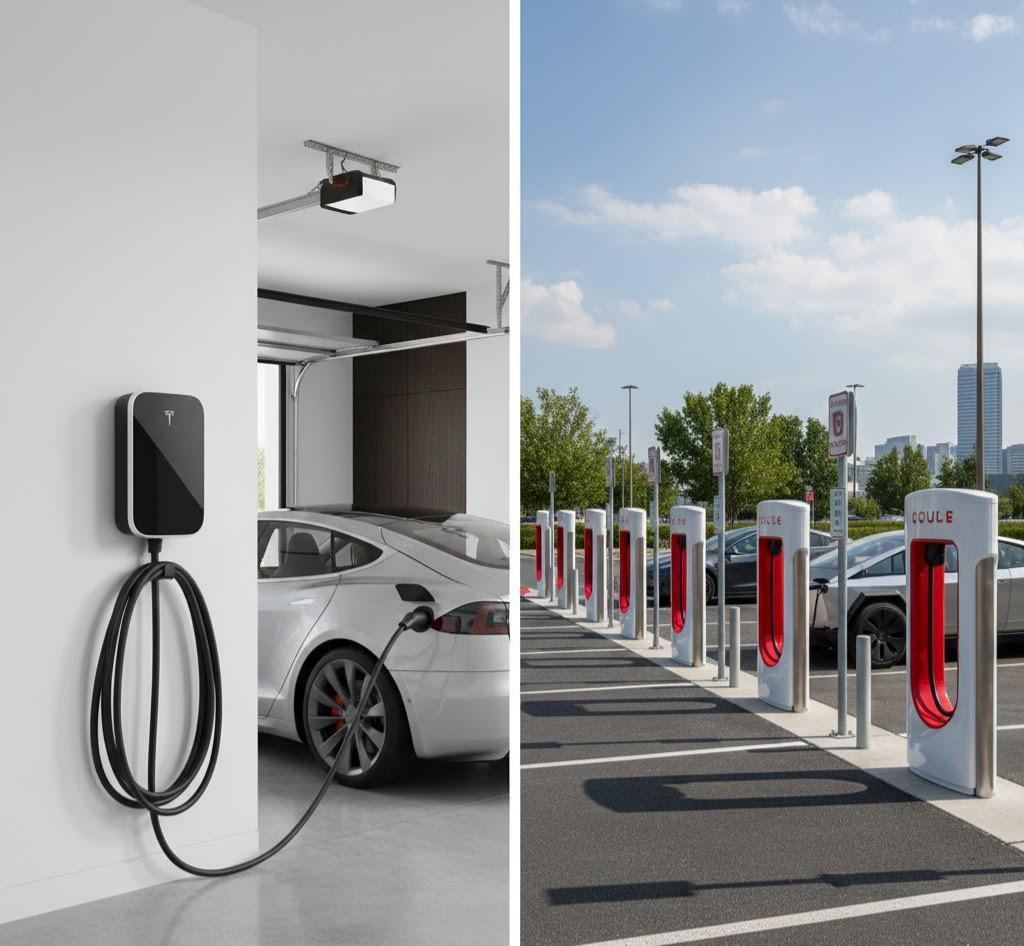
Not all chargers are equal. Understanding the difference between charging levels will help you make smarter decisions about when and where to plug in.
Level 1 Charging (Standard 120V Outlet)
This is the slowest option, typically adding only 3–5 miles of range per hour. While impractical for primary charging, it is the gentlest on the battery — low current, minimal heat, and steady delivery. Good as a supplemental option when overnight time is ample.
Level 2 Charging (240V Home Charger or Public AC Charger)
This is the ideal primary charging method for most Tesla owners. A Tesla Wall Connector or a NEMA 14-50 outlet setup can deliver 25–44 miles of range per hour. Level 2 AC charging keeps heat low, allows the BMS to manage temperature effectively, and provides convenience without the degradation risks of DC fast charging. Owners who rely primarily on home Level 2 charging consistently experience slower long-term battery degradation.
DC Fast Charging / Supercharging
Tesla’s Supercharger network can deliver up to 250 kW, adding hundreds of miles of range in under 30 minutes. While revolutionary for road trips, frequent Supercharging is one of the fastest ways to degrade your battery. The high current generates significant heat, and the rapid voltage shifts stress the cell chemistry. Reserve Supercharging for long-distance travel, not daily commuting.
Rule of thumb: Home charging for daily life; Supercharging for road trips.
5. Temperature Management: Heat Is the Enemy
Temperature is one of the most underestimated factors in battery health. Both extreme heat and extreme cold affect performance, but heat is more damaging over the long run.
Hot Weather Tips
- Park in the shade or a garage whenever possible. Direct sun exposure on a hot day can raise the battery’s internal temperature significantly.
- Tesla’s thermal management system will run cooling fans while the car is parked in high heat, consuming battery power in the process. Plugging in during this time allows the car to draw from the grid rather than the battery.
- Avoid charging a battery that is already hot from driving. Allow 20–30 minutes for temperatures to stabilize before plugging into a Supercharger on a hot day.
Cold Weather Tips
- Lithium-ion batteries charge more slowly and deliver less range in cold temperatures. Charging a cold battery at high rates can cause lithium plating — a form of irreversible damage inside the cells.
- Use the Battery Preconditioning feature (available via the Tesla app when navigating to a Supercharger) to warm the battery before arrival. This makes charging faster and protects the cells.
- Keep the car plugged in overnight in cold climates. The BMS will use grid power — not the battery — to maintain an optimal temperature range.
-39.jpg?w=1024&h=559)
6. Leverage Tesla’s Smart Charging Features
Tesla has built a suite of software tools specifically designed to help owners protect their battery. Use them.
Scheduled Charging
Set a departure time in the Tesla app. The car will calculate when to begin charging so that it finishes just before you leave — minimizing the time the battery spends at a high state of charge. Many utility companies offer off-peak electricity rates at night, making this feature a double win: cheaper electricity and better battery care.
Scheduled Departure
Similar to Scheduled Charging, this feature also preconditions the cabin and battery to the ideal temperature before your drive — so you leave with a warm (or cool) interior and an optimally conditioned battery, without draining the pack.
Energy App and Monitoring
The Tesla mobile app and the in-car Energy display allow you to track energy usage, charging sessions, and efficiency trends. Noticing an unusual drop in range or charging speed early can alert you to potential issues before they become costly.
Software Updates
Tesla regularly pushes over-the-air updates that include refinements to the battery management algorithms, charging protocols, and thermal management logic. Keeping your vehicle updated ensures you benefit from the latest optimizations without lifting a finger.
7. Avoiding Deep Discharges and Long Idle Periods
Just as important as your upper charge limit is your lower limit. Never make a habit of letting the battery fall below 10–15%. Deep discharges accelerate cathode degradation and, in extreme cases, can trigger the vehicle’s low-power consumption mode — a protective state that limits onboard electronics.
The 1% Rule for Extended Parking: Tesla batteries discharge at approximately 1% per day due to passive electronics and connectivity. If you plan to leave your vehicle at an airport or storage facility for an extended period, leave the battery at a charge level that accounts for this drain. For a 14-day trip, leave with at least 34–40% charge to maintain a safe buffer above 20%.
To reduce idle battery drain:
- Enable Energy Saving mode when the car will be parked for a long time.
- Disable Sentry Mode in trusted locations (home, work). Sentry Mode continuously runs cameras and sensors, consuming a notable amount of power when idle.
8. Driving Habits That Support Battery Longevity
Charging habits don’t exist in isolation — how you drive directly affects how often and how aggressively you need to charge.
- Use regenerative braking. Set it to “Standard” mode to recover the maximum energy during deceleration. This reduces energy waste and extends the range between charges.
- Avoid aggressive acceleration on a routine basis. While occasional spirited driving is part of the Tesla experience, sustained hard acceleration draws heavy current and generates heat in the motor and battery.
- Drive at moderate highway speeds. Aerodynamic drag increases exponentially with speed; driving at 75 mph instead of 65 mph can reduce range by 15–20%, leading to more frequent charging cycles.
- Pre-cool or pre-heat the cabin while plugged in. Running climate control on battery power while driving forces the battery to work harder. Pre-conditioning the cabin while still plugged in uses grid power and preserves range.
9. Recognizing Normal vs. Accelerated Degradation
All lithium-ion batteries degrade over time — this is unavoidable. What matters is the rate. Normal degradation is gradual, with most Tesla owners experiencing roughly 5% capacity loss after 50,000 miles of real-world driving when good habits are followed.
Signs of accelerated degradation include:
- A noticeable and sudden drop in maximum displayed range
- Charging speeds that are significantly slower than when the vehicle was new at the same SoC
- More frequent need for high-SoC charges to accomplish the same trips
If you observe these signs, consult Tesla’s service app or contact Tesla Support to run a diagnostic on the battery pack.
10. A Practical Daily Routine Summary
To put everything together, here is a straightforward charging routine that any Tesla owner can follow:
- Set your daily charge limit to 80% and keep it there as your default.
- Plug in every night at home using a Level 2 charger, even if you only used 10–20% during the day. Small, frequent top-ups are gentler than large recovery charges.
- Use Scheduled Charging to take advantage of off-peak electricity rates and minimize time at high SoC.
- Reserve Supercharging for road trips and use Battery Preconditioning before arriving at a Supercharger.
- Park in shade or a garage in hot weather, and keep the car plugged in during temperature extremes so the BMS can manage thermal conditions using grid power.
- Never let the battery drop below 20% in daily use, and never leave it at 100% for more than a few hours.
- Keep the software updated to ensure the BMS operates with Tesla’s latest improvements.
Conclusion
A Tesla battery is a sophisticated, long-lasting piece of engineering — but its longevity is not purely passive. It responds meaningfully to the choices you make every day. By respecting the 20–80% charging window, favoring home AC charging over frequent Supercharging, managing temperature proactively, and leveraging Tesla’s intelligent software features, you can expect your battery to retain the vast majority of its capacity for hundreds of thousands of miles.
These habits do not require technical expertise — just consistency. And consistency, in the long run, translates to fewer service visits, better resale value, and the confidence that your Tesla will perform as powerfully on day 2,000 as it did on day one.